
Airtable nonprofit pricing matters when a mission-driven team needs structure, permissions, and automation without letting software spend drift out of control. The discount is real, but the true cost depends on how many people need edit access, whether you can live without annual prepay savings, and whether the Team plan is enough for your workflow. Here I break down the current rate, who qualifies in the United States, what is included, what is missing, and how I would judge the fit for a nonprofit operation.
Key facts that shape the decision
- The nonprofit rate is $12 per collaborator per month on Airtable’s Team plan, based on a 50% discount.
- The annual-plan discount does not stack with the nonprofit offer, so this is not a prepay deal.
- Most U.S. nonprofits need legal registration, and Airtable typically asks for an IRS 501(c)(3) determination letter.
- Read-only collaborators are non-billable, but edit, comment, and creator access can turn into real seat costs fast.
- Airtable AI is not included on discounted nonprofit plans.
- Approved applicants usually hear back within 2 business days and have 4 weeks to activate the discounted plan.
What the nonprofit plan costs right now
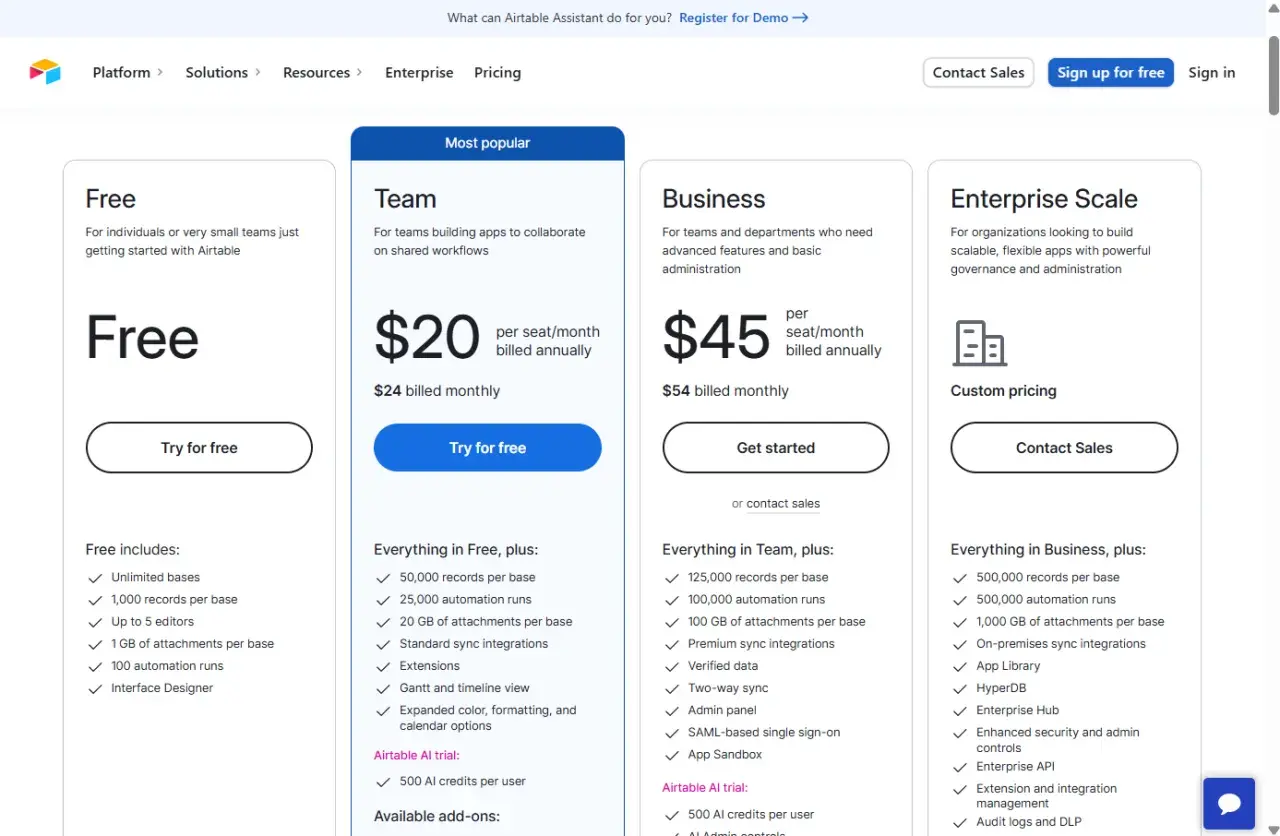
The current nonprofit offer is straightforward: Airtable discounts the Team plan by 50% for qualifying organizations. That means the monthly Team rate of $24 per user becomes $12 per user per month, or $144 per user per year in annualized terms. The important catch is that Airtable does not layer the annual-plan discount on top of the nonprofit discount, so I would budget from the nonprofit monthly rate rather than from the annual prepay price.
| Plan | Published price | Billing note |
|---|---|---|
| Team, standard monthly | $24 per user/month | Monthly billing |
| Team, standard annual | $20 per user/month | Billed annually |
| Team, nonprofit | $12 per user/month | 50% off the monthly Team rate; annual discount does not stack |
If I were building a nonprofit budget, I would treat that $12 figure as the baseline and then multiply it only by the seats that truly need paid access. That brings us to the part many teams underestimate: eligibility rules.
Who can qualify for the discount
Only nonprofits and accredited educational organizations qualify for the discount program, and Airtable is selective about what counts. For most U.S. organizations, the usual proof is an IRS exemption determination letter showing 501(c)(3) status. Unregistered groups cannot apply, and the company excludes several categories that sometimes expect to qualify automatically.
- Organizations involved in political or legislative activity
- Government offices or departments
- Churches, associations of churches, and other religious or evangelical organizations
- Groups that try to influence public opinion
- Hospitals, care providers, and organizations tied to health insurance or group health plans
- Private grant-making, independent, or operating foundations
- Organizations that discriminate on protected characteristics or promote a specific religious doctrine as part of their mission
International nonprofits are eligible too, which matters if your U.S. organization works with chapters or partner groups abroad. Once eligibility is clear, the next question is whether the Team plan actually fits the way your staff and volunteers work.
What the discounted Team plan includes
The nonprofit discount sits on top of Airtable’s Team plan, so the feature set is much closer to a real operations platform than a simple spreadsheet replacement. In practical terms, you get tools for automations, forms, extensions, Interface Designer, Timeline and Gantt views, locked and personal views, calendar views, and restricted share links. The plan is built for collaboration, not just storage.
| Feature | Nonprofit Team plan |
|---|---|
| Records per base | 50,000 |
| Attachment storage per base | 20 GB |
| Revision and snapshot history | 1 year |
| Automations, forms, and interfaces | Included |
| AI / Omni | Not available on discounted nonprofit plans |
Two limits matter most to nonprofit teams. First, the 50,000-record ceiling per base is generous for small and mid-sized programs, but it can vanish quickly if you track events, contacts, intake records, and reporting in one place. Second, AI is not part of the discounted nonprofit package, so I would not build a buying case around it. If you need controlled access for outside partners, Airtable also offers a 50% discount on Portals after approval, which can be useful for sharing a polished view without opening up the whole workspace.
How seat count changes the real budget
The real budget risk is not the headline rate. It is the number of billable collaborators. On the Team plan, read-only collaborators are non-billable, but owners, creators, editors, and commenters are billed. That means a nonprofit can keep costs low if volunteers only need visibility, while a highly collaborative team will pay for every person who can actively shape the data.
| Example setup | Billable seats | Monthly cost at nonprofit rate |
|---|---|---|
| 1 coordinator, 4 editors, 10 read-only volunteers | 5 | $60 |
| 3 staff editors, 12 read-only volunteers | 3 | $36 |
| 6 staff with edit or comment access | 6 | $72 |
| 10 staff with edit or comment access | 10 | $120 |
When I price this out for a nonprofit, I focus on permissions before I focus on features. If someone only needs to see schedules, forms, or status updates, I would try to keep them on read-only access. That one decision often matters more than any percentage discount, because it determines whether the subscription stays lean or quietly becomes another line item that grows with every new program.
How to apply without slowing down your launch
The application flow is simple enough, but it still needs a little administrative discipline. Approved applicants usually hear back within 2 business days, and once approved, the organization has 4 weeks to activate the discounted plan. The workspace must be paid by credit card, and one-time payments are not supported. If a discounted workspace later drops to Free because of a failed payment, the discount does not restore itself automatically.
- Gather legal proof of nonprofit status, such as the IRS 501(c)(3) determination letter for most U.S. organizations.
- Submit the discount application with the organization’s official details and the email address you plan to use.
- Wait for approval before opening the account you want tied to the nonprofit rate.
- Create or update the Airtable account with the same email address used in the application.
- Ask support to switch the workspace to the discounted nonprofit plan.
- Track the activation window so board approvals or procurement delays do not force you to rework the process.
There is one administrative upside here: nonprofits do not need to reapply every year just to keep the discount alive. Once the plan is active, the more important decision is whether Airtable is actually the right kind of software for the work you need to do.
When Airtable is the right fit for a nonprofit
I usually think of Airtable as workflow software first and database software second. That makes it a strong fit when the problem is not just storing information, but moving people through a process. It is especially good for grant tracking, volunteer coordination, event planning, program intake, internal dashboards, and lightweight CRM-style workflows where different teams need different views of the same data.
| Use Airtable if you need | Consider something else if you need |
|---|---|
| Forms, automations, dashboards, and cross-team collaboration | A basic spreadsheet with very little workflow logic |
| Fast internal tools for program staff and operations teams | A full donor CRM or case management system with deeper nonprofit-specific features |
| Controlled access for staff, volunteers, and partners | Highly regulated records or complex compliance requirements |
The Free plan can still work as a pilot, but I would not rely on it for long if your work is active. Once you start pushing past 1,000 records per base or 1 GB of attachments per base, the free ceiling shows up quickly. At that point, the nonprofit discount becomes useful not because Airtable is cheap in isolation, but because it can scale a real workflow without forcing you into a different platform too early.
The budget test I would run before approving it
- Count billable collaborators, not total users.
- Check whether read-only access is enough for volunteers, board members, or partner organizations.
- Verify that 50,000 records per base and 20 GB of attachments per base fit your program data.
- Assume Airtable AI is unavailable on the discounted nonprofit plan.
- Decide early whether you may need a sales-led Business or Enterprise quote instead of the self-serve Team discount.
If those five checks all pass, Airtable is a practical nonprofit tool rather than a budget surprise. If one of them fails, I would change the workflow or choose a different system before forcing the platform to do a job it was never meant to do.
