
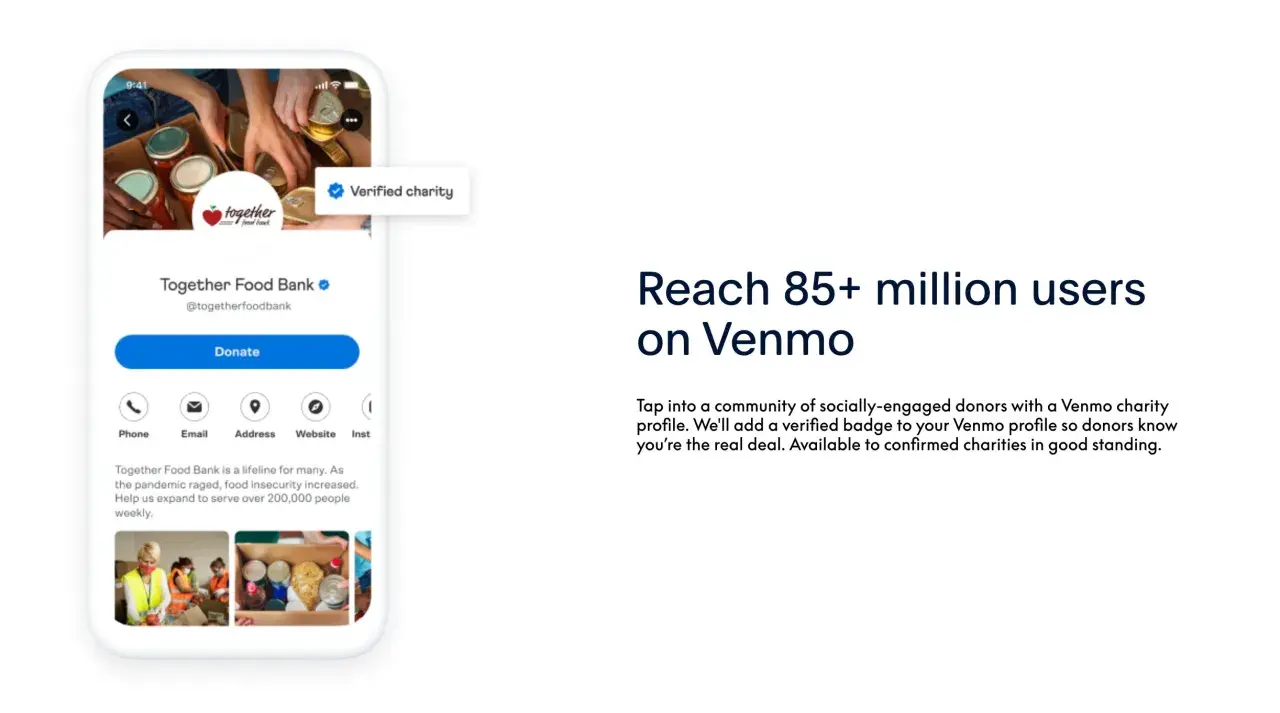
Here are the essentials before you set up Venmo for donations
- A venmo charity account is really a verified charity profile, and it is only available to eligible charitable organizations and 501(c)(3)s.
- Setup starts in PayPal, and the PayPal charity account owner must match the Venmo owner.
- The profile is donation-only, so it is not a replacement for a full payment, CRM, or accounting workflow.
- Venmo charges 1.9% + $0.10 for each donation of $1.00 or more.
- QR codes and search visibility are the fastest ways for donors to find you.
- I would treat Venmo as a front-end giving channel, not the system of record for your nonprofit.
What a charity profile is and what it is not
A charity profile on Venmo is built for verified nonprofit fundraising, not for casual personal transfers. In practice, that means it behaves like a donor-facing payment profile with a blue verification checkmark, public branding, and donation settings. It is not the same thing as a personal profile, and it is not the same thing as a business profile that exists to accept payment for goods or services.I think that distinction matters because a lot of confusion starts when teams try to use the wrong profile type and then wonder why the flow feels clumsy. Venmo's current setup options are charity profiles and business profiles; its old organization-account beta is no longer available for new accounts. Once you understand that, the rest of the setup decisions become much easier.
| Profile type | Best fit | Main limitation |
|---|---|---|
| Personal profile | Friends, family, and informal transfers | Not meant for charity fundraising |
| Business profile | Registered businesses, associations, clubs, and sellers of goods or services | Not the right structure for verified charitable fundraising |
| Charity profile | Charitable organizations and 501(c)(3)s | Donation-only and tied to verification rules |
Once that distinction is clear, the setup path makes a lot more sense, because the platform expects a nonprofit admin workflow rather than a personal one.
How to set it up without getting blocked by the platform checks
The cleanest way to avoid setup problems is to prepare the PayPal side first. Venmo says charity profiles start in PayPal, so you need a PayPal Business account, confirmed charity status, and an owner identity that matches across both platforms. I would not try to improvise around that requirement, because mismatched ownership is one of the easiest ways to slow the process down.
If I were setting this up for a nonprofit team, I would make sure these items were ready before touching Venmo:
- A PayPal Business account already tied to the nonprofit
- Confirmed charity status in PayPal
- The same owner name on the PayPal charity account and the Venmo profile
- A dedicated phone number and email address for the charity profile
- Public-facing copy, logo, and background image ready for review
The actual flow is straightforward once those pieces are in place. First, you confirm charity status in PayPal. Next, you open the PayPal App Center, find Venmo charity profiles, and click Get Started so the nonprofit data can move into Venmo. Then you finish the profile in Venmo by verifying the phone number, adding the email address, creating the password, choosing the username and category, and publishing the profile after reviewing the preview.
There is one more practical constraint worth calling out: if you already have a Venmo business profile, you cannot convert it into a charity profile. Venmo also says contact information cannot be reused across multiple accounts. That means the safest approach is to plan the charity account from the start instead of trying to retrofit an existing setup.
From there, the real question becomes how supporters will find the profile and how you will guide them to donate quickly.
How donors find you and finish a donation
For donors, the experience should feel simple and recognizable. Charity profiles show a blue verified checkmark, which helps users distinguish them from normal personal accounts. They can search by charity name, use the Charities filter, browse by category, or return to a charity they have already supported under Top Charities.
QR codes are the fastest path when you are asking for donations in person or through print materials. Venmo lets you open the profile QR code in the app, share it by text or email, and print a high-quality PDF version. That makes it easy to place the code on event signage, handouts, donation cards, and slide decks without redesigning your whole campaign.
The donation flow is short, but not entirely native to the app. Donors tap Donate, choose or enter an amount, add a note, and then Venmo redirects them to a web browser to process the donation before they confirm again. I would not call that a problem, but it is worth knowing in advance because it means the experience is slightly less seamless than a one-tap payment inside the app.
Venmo also gives charity admins some visibility controls. Marketing settings can push the profile into feeds, search results, and emails, and you can toggle those options on or off independently. That is useful because the best discoverability setting is not always the most public one, especially if your campaign has privacy or brand-sensitive considerations.
Once donors are finding you reliably, the next issue is cost, compliance, and whether Venmo belongs in your core fundraising stack at all.
The fees and limits worth budgeting for
Venmo charges charity profiles a fee of 1.9% + $0.10 for each donation of $1.00 or more. On a $100 donation, the fee is $2.00, so the charity receives $98. Venmo also states that the fee cannot be refunded. That is not a dealbreaker, but it does mean you should think carefully about how much of your giving mix will run through this channel.
I pay close attention to small gifts here, because the fixed ten-cent fee becomes more noticeable when supporters give low-dollar amounts. Venmo can still work well for event-day donations, peer sharing, and community campaigns, but it is less attractive if your strategy depends on lots of tiny micro-donations.
| Issue | What it means in practice | Why it matters |
|---|---|---|
| Donation fee | 1.9% + $0.10 per donation of $1.00 or more | You need to watch margin on small gifts |
| Donation-only profile | The charity profile is designed to receive donations, not send payments out | You still need separate workflows for operations and vendor payments |
| Management model | Charity profiles are managed from the Venmo app; web access is mainly for statements | Your admin team needs a mobile-friendly operating routine |
| Eligibility checks | Charities must be in good standing with the IRS, the California Franchise Tax Board, and the California Attorney General | Eligibility can be blocked if compliance is not current |
| Ownership | Profile ownership cannot be transferred | Choose the right person to own the account from day one |
There are also hard limits to keep in mind. You cannot manage the charity profile fully on the web, although donors can still donate through a browser and you can access statements and transaction history there. And if you are hoping to switch an existing business profile into a charity profile, that conversion is not available. Those are the kinds of constraints that do not sound dramatic at first, but they shape how well the tool fits your team.
At that point, the remaining question is not whether Venmo works, but how it sits alongside the rest of your nonprofit software stack.Where Venmo fits in a nonprofit software stack
I would use Venmo as a donation intake layer, not as the backbone of the fundraising operation. It is good at reducing friction when a donor is already on their phone, already in a Venmo mindset, or already standing in front of a QR code. It is not designed to replace your CRM, your receipting workflow, your accounting system, or your recurring giving platform.
| Software layer | What Venmo does well | What should handle the rest |
|---|---|---|
| Donation intake | Fast mobile gifts, event donations, and social sharing | Campaign pages, QR codes, and on-site signage |
| Donor data | Basic donation capture | A CRM for constituent history, segmentation, and stewardship |
| Accounting | Transaction visibility and statements | Bank reconciliation, ledger posting, and audit-ready records |
| Recurring giving | Not its strongest use case | Dedicated recurring donation tools |
This is why I usually describe Venmo as a front door. It can open quickly and reduce friction, but the rest of the house still needs structure. If your nonprofit already has a CRM and a donation form platform, Venmo can sit beside them as a community-friendly entry point rather than a substitute for them. That is especially useful for local campaigns, peer-to-peer outreach, and event-based fundraising where speed matters more than a long checkout flow.
Once you see it that way, the launch checklist becomes much more important than any extra feature.
What I would tighten before launch
If I were launching a charity profile for a nonprofit, I would check five things before telling supporters to use it. First, I would assign one clear owner who has access to both PayPal and Venmo. Second, I would test the profile with a small donation so I could see the exact donor journey. Third, I would make sure the public name, description, and images match the nonprofit's website and other channels.
Then I would place the QR code everywhere it can realistically help: at events, in email footers, on printed materials, on slide decks, and in social posts. Finally, I would decide in advance what Venmo is for. If the answer is "quick community gifts and event fundraising," that is a solid use case. If the answer is "our only donation system," I would push back and add a more robust giving form and CRM workflow around it.Used that way, Venmo can help a nonprofit collect donations with less friction and more familiarity, especially from supporters who already use the app. I would still keep the CRM as the source of truth, but I would absolutely consider Venmo a useful donation channel when the campaign is built for mobile, trust, and speed.
