
What matters most before you budget
- Eligible nonprofits can receive 10 donated Enterprise Edition licenses through the Power of Us program.
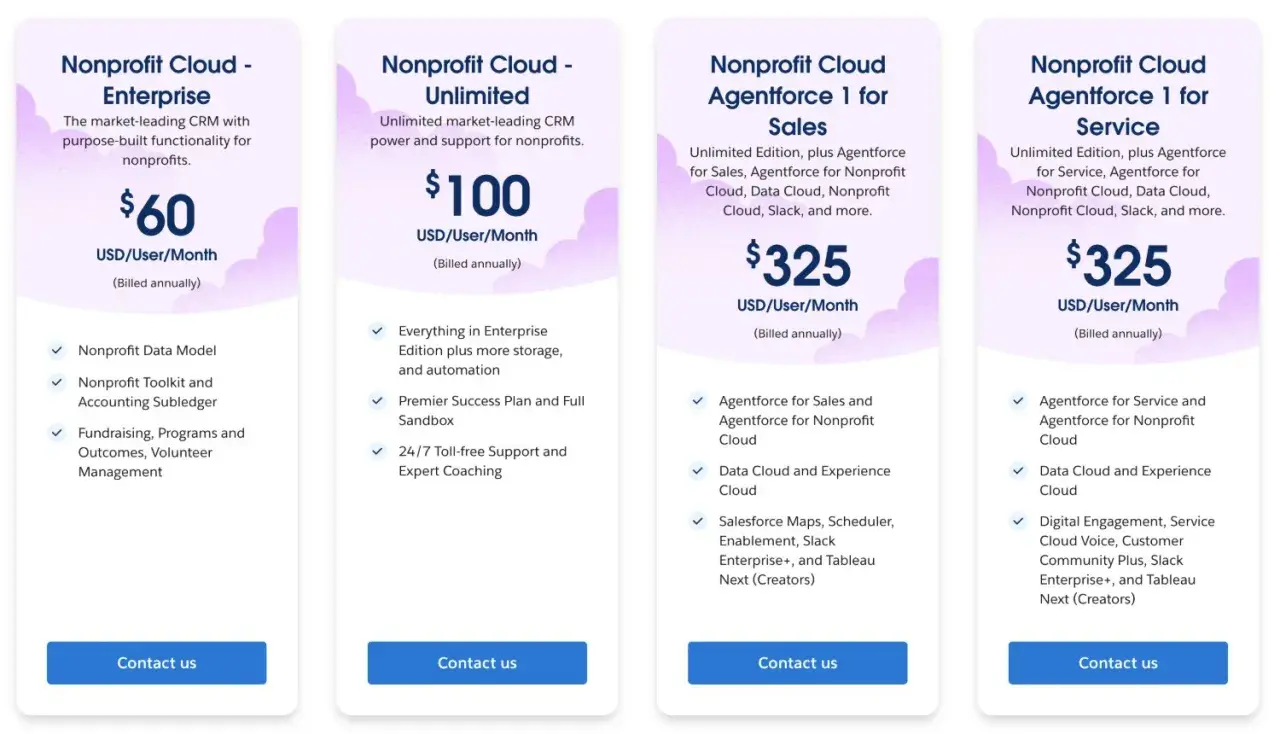
- Public list prices currently start at $60 per user/month for Nonprofit Cloud Enterprise and $100 per user/month for Unlimited, billed annually.
- Grantmaking editions are priced separately and start at $175 per user/month.
- The true year-one cost also includes implementation, data cleanup, training, app fees, and internal admin time.
- In the U.S., sales tax may still apply in some states even for 501(c)(3) organizations.
- Exact nonprofit discounts on extra seats are shown after approval, so the final quote can differ from the public list price.
How Salesforce structures nonprofit pricing
Salesforce's nonprofit stack is now often called Agentforce Nonprofit in current documentation, but the pricing pages still use Nonprofit Cloud. That naming split matters less than the budget logic behind it: eligible nonprofits can enter through the Power of Us program, receive donated licenses, and then add paid seats or specialized products as their needs grow.
I think of the structure as three layers:
- Entry layer - the Power of Us program, which gives eligible organizations 10 donated Enterprise Edition licenses.
- Growth layer - discounted additional licenses, products, and services that appear after approval in the portal.
- Expansion layer - specialized editions such as grantmaking or AI-heavy bundles when the base CRM is no longer enough.
Two details are easy to miss: pricing is typically billed annually, and U.S. nonprofits can still face sales tax in some states and municipalities if they are not exempt at the state level. Once that structure is clear, the next step is looking at the actual price points Salesforce publishes today.

The current price points that matter in 2026
For budget planning, I would treat the public list price as the ceiling before any nonprofit discount. That makes it easier to compare editions and to see how quickly the bill changes when you add specialized functionality.| Edition | Public price | Annual equivalent | Practical read |
|---|---|---|---|
| Nonprofit Cloud Enterprise | $60/user/month | $720/user/year | Core CRM for fundraising, programs, and operations |
| Nonprofit Cloud Unlimited | $100/user/month | $1,200/user/year | More support and more room to scale |
| Nonprofit Cloud Agentforce 1 for Sales | $325/user/month | $3,900/user/year | Advanced bundle with AI, data, and Slack |
| Nonprofit Cloud Agentforce 1 for Service | $325/user/month | $3,900/user/year | Service-heavy teams that need the same bundle |
| Nonprofit Cloud for Grantmaking Enterprise | $175/user/month | $2,100/user/year | Grant management for foundations and grantmakers |
| Nonprofit Cloud for Grantmaking Unlimited | $225/user/month | $2,700/user/year | Grantmaking teams that want premium support |
What your first-year budget really needs to cover
The software fee is only one part of the bill. In practice, the first year usually includes setup, cleanup, training, and some level of internal ownership, and those costs are the ones that catch small teams off guard.
- Implementation help - a consulting partner or freelancer to design the org, configure fields and workflows, and avoid structural mistakes.
- Internal admin time - the staff hours needed to own configuration, user support, reporting, and small fixes.
- Data migration and cleanup - deduping contacts, standardizing fields, and moving records from old systems.
- Third-party apps - payment processing, document generation, case management, or other tools from the Salesforce app marketplace, often with their own license fees.
- Extra access - seats for consultants or integrations that need secure login access.
- Training and adoption - onboarding staff so the system actually gets used.
My rule of thumb is simple: if a nonprofit is new to Salesforce, I would not budget only for licenses. I would set aside roughly 1x to 3x the first-year license spend for setup work if the data is messy or the process is still being defined. That is a planning heuristic, not an official quote, but it is a more realistic starting point than assuming the donated seats make the project free. Once the overhead is clear, the next question is how that plays out in real seat counts.
How the math changes by organization size
The formula is straightforward: annual software cost = number of paid seats x monthly price x 12. That matters because two nonprofits can have the same headcount and still end up with very different budgets depending on how many users need access and which edition they actually need.
| Scenario | Paid seats | Annual software cost | What it tells you |
|---|---|---|---|
| 10 users covered by donated seats | 0 | $0 | Best entry point, but setup still costs money |
| 12-user org on Nonprofit Cloud Enterprise | 2 | $1,440 | Small expansion beyond the donated licenses |
| 15-user org on Nonprofit Cloud Enterprise | 5 | $3,600 | Cost scales predictably with headcount |
| 4 grantmaking users | 4 | $8,400 | Specialized products move the budget quickly |
| 3 service users on Agentforce 1 | 3 | $11,700 | Advanced bundles are for teams that truly need them |
This is why the budget conversation changes so much by use case. A small direct-service nonprofit may stay close to the donated baseline, while a foundation or support-heavy organization can move into a much higher tier very quickly. Once you can calculate seat math, the decision becomes strategic rather than emotional.
When Salesforce is a strong fit and when it is not
I usually recommend Salesforce when the organization needs more than contact storage. If fundraising, programs, volunteer work, and reporting all need to live in the same system, the platform can replace a lot of brittle spreadsheets and disconnected tools.
- Good fit - multi-team workflows, complex reporting, grantmaking, constituent history, case tracking, or repeated cross-department follow-up.
- Borderline fit - a small team with simple donor tracking that may not use enough of the platform to justify the setup burden.
- Usually too much - a light mailing list, a one-off donation form, or a basic CRM need that does not require process automation.
The most common mistake I see is buying for future complexity before the team has solved today's workflow. If you can describe the process you will run in the next 6 to 12 months, you can usually make a cleaner product choice and avoid paying for features that sit idle. The same discipline also helps when you start looking for ways to reduce the bill.
How to keep nonprofit Salesforce costs under control
There is nothing glamorous about cost control, but it is where a lot of nonprofit projects succeed or fail. I would start with the simplest version that still works, then expand only after the team is using the system consistently.
- Start with the donated licenses and only buy paid seats for active users.
- Choose Enterprise first unless you have a real reason for Unlimited or a specialized bundle.
- Keep the first implementation narrow. Add automations and apps after the core process works.
- Use the 30-day trial only as a test bed. Do not build the production rollout in it, because the trial does not convert.
- Ask for a clear separation between licenses, services, and taxes in every quote.
- Bring one accountable admin or owner into the plan early.
I would also be cautious about piling on third-party apps too early. App licensing can look small individually, but several modest subscriptions can quietly outgrow the software budget you thought you had. Once those guardrails are in place, the last thing to decide is the budget you would actually approve.
The budget I would approve before signing anything
If I were advising a nonprofit from zero, I would approve the smallest useful configuration first: 10 donated Enterprise Edition licenses if the organization qualifies, a limited implementation scope, and a written estimate for data cleanup and training before any upgrade talk. That gives you a real base to work from instead of a shiny quote that hides the work behind it.
The cleanest way to think about this is simple: licenses tell you the entry price, but the project budget tells you whether the platform will actually stick. If Salesforce is going to help your team serve people faster, report better, and keep data in one place, then the spend can be justified. If it is only replacing a spreadsheet, I would keep the rollout smaller and prove value before expanding.
