
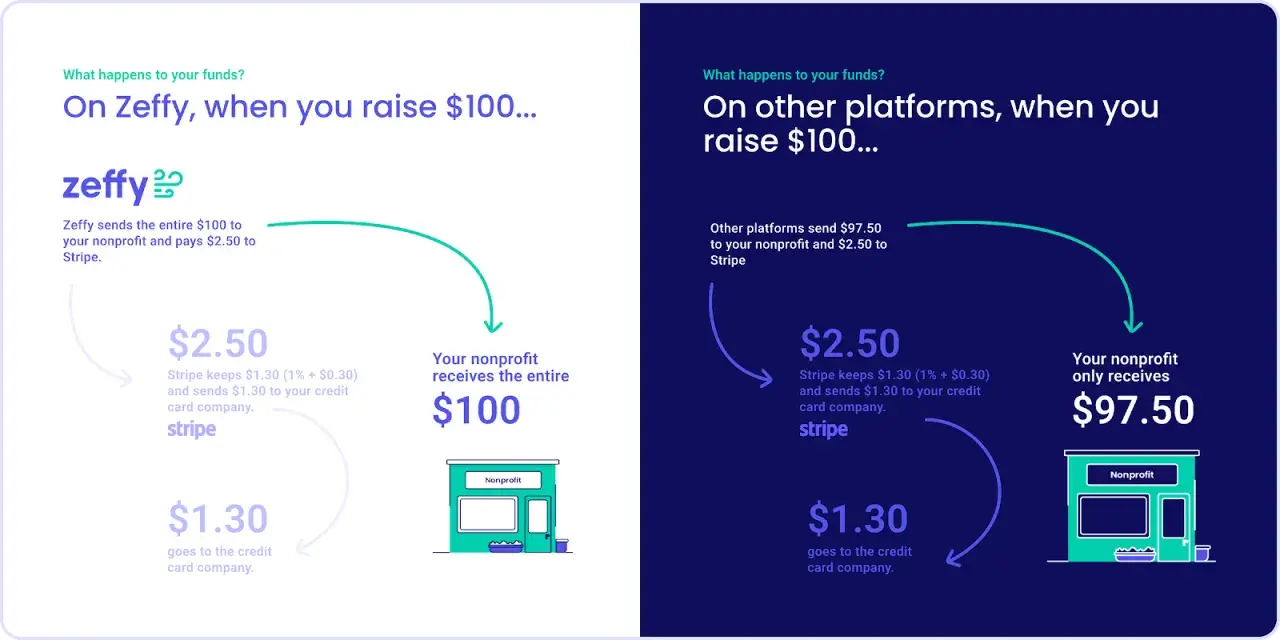
Stripe nonprofit fees are usually easiest to understand when you separate the processor’s base rate from any nonprofit discount and from the software layer sitting on top of the donation form. For U.S. nonprofits, the real issue is rarely just the card fee itself; it is the full cost of accepting gifts, handling recurring donations, and avoiding extra platform charges that quietly shrink each donation.
What matters most in Stripe’s nonprofit pricing
- Stripe’s standard U.S. online card pricing is typically 2.9% + $0.30 per successful charge.
- Stripe does not charge setup fees or monthly fees on standard pricing, which keeps the base cost predictable.
- Eligible nonprofits may qualify for a lower rate, but that is not something I would assume without confirmation in the account.
- ACH Direct Debit can be much cheaper than cards for larger gifts and recurring donations.
- Refunds, disputes, currency conversion, and instant payouts can change the real cost more than many teams expect.
- Donation software can add its own fee layer, so the processor rate is only part of the picture.
What Stripe charges nonprofits in the U.S. today
For a direct online donation flow, the starting point is simple: most U.S. nonprofits on standard pricing should expect a card processing cost around 2.9% + $0.30 per successful transaction. On a $50 donation, that works out to about $1.75 in fees; on a $100 donation, it is about $3.20. I usually model these costs per gift instead of averaging them across the month, because the fixed 30-cent component matters a lot more on smaller donations.
| Donation amount | Card fee at 2.9% + $0.30 | Net to the nonprofit | ACH fee at 0.8% capped at $5 | Net to the nonprofit |
|---|---|---|---|---|
| $25 | $1.03 | $23.97 | $0.20 | $24.80 |
| $50 | $1.75 | $48.25 | $0.40 | $49.60 |
| $100 | $3.20 | $96.80 | $0.80 | $99.20 |
| $250 | $7.55 | $242.45 | $2.00 | $248.00 |
| $1,000 | $29.30 | $970.70 | $5.00 cap | $995.00 |
That table is the practical lens I use. Small gifts tend to absorb the fixed fee more visibly, while larger gifts make percentage-based processing feel more expensive. The good news is that Stripe’s standard pricing does not add setup or monthly charges, so the processing line is usually clean and easy to forecast.
From there, the important question becomes whether your nonprofit qualifies for anything better than the public standard rate and how that rate is actually applied.
When a nonprofit discount can apply
Stripe Support says eligible nonprofit organizations that primarily accept donations can receive discounted processing fees in select regions. In practice, that means the nonprofit rate is something to verify, not something to assume just because you are a 501(c)(3). Stripe also indicates that nonprofit status is typically verified with an EIN or an IRS letter showing 501(c)(3) status.There are two details that matter here. First, the discount is not framed as a universal U.S. public rate on the pricing page. Second, charitable pricing is usually tied to the way the business is categorized, including merchant category codes such as MCC 8398. That is why mixed-use organizations often run into friction: a group that accepts donations, sells event tickets, and processes merchandise orders may not fit neatly into a single donation-only pattern.
- If your organization is donation-first, verify eligibility early and keep that documentation ready.
- If you also sell tickets, memberships, or merchandise, separate those flows where possible.
- If you use a fundraising platform, ask whether the nonprofit discount still passes through unchanged.
- If you see a “charity rate” in a proposal, confirm whether it is Stripe pricing, platform pricing, or both.

How nonprofit software changes the real cost
The processor fee is only one layer. Many nonprofits accept donations through software that sits between the donor and Stripe, and that software may add its own charge, feature fee, or platform surcharge. In other words, the real cost can look like processor fee + software fee + optional billing or platform fee.
| Setup | What you pay Stripe for | Extra cost to watch | Best fit |
|---|---|---|---|
| Payment Links or Checkout | Standard processing only | Usually none beyond the processor | Simple donation pages and campaign landing pages |
| Billing for recurring gifts | Processing plus Billing usage | Stripe Billing adds a percentage of Billing volume | Monthly giving programs and donor retention workflows |
| Connect or a platform model | Processing across connected accounts | Platform pricing, routing, or revenue-share logic | Chapters, local funds, or multi-organization fundraising |
| Third-party fundraising software | Processing through Stripe | Vendor SaaS fee, donor fee, or per-transaction surcharge | Teams that want fundraising features without custom development |
The recurring-donation case is the one many finance teams underestimate. If you automate monthly gifts through Billing, Stripe Billing can add a separate usage fee on top of the payment-processing layer. On a $20 recurring gift, even a seemingly small Billing percentage becomes meaningful when multiplied across hundreds or thousands of donors. That is why I always ask for the full effective cost, not just the headline card rate.
For nonprofit software, the key comparison is not “Stripe or not Stripe.” It is “how many fee layers are sitting between the donor’s click and the deposit in the bank?”The costs that usually surprise finance teams
Most nonprofit budgets do not break because of the base card rate. They break because of the edge cases. Stripe’s pricing pages note that refunded card payments do not return the original processing fee, so a refunded donation still leaves you with the payment cost you already absorbed. That is normal in payments, but it surprises teams that treat refunds as financially neutral.
- Refunds do not give back the original processing fee, so a fully refunded donation still carries cost.
- Disputes can add a fee of $15, and if you counter a dispute, there may be another $15 countering fee that is returned only if you win.
- Currency conversion can add around 2% on top of the transaction when you accept or settle in another currency.
- Instant payouts cost extra if you want fast access to funds instead of waiting on the standard payout schedule.
- Bank-transfer refunds may carry additional fees depending on the payment method and pricing schedule.
Disputes deserve special attention because nonprofits often think of donations as low-risk. They usually are, but a few preventable chargebacks can erase the margin from dozens of small gifts. Clear statement descriptors, strong receipts, and a donor-facing support email are boring controls, but they work. If I had to choose one operational fix, I would start there before buying any fraud tool.
Once you know the hidden costs, the next step is to choose donation rails and software features that lower them without making giving harder.Ways to lower fees without hurting donor experience
The cheapest option is not always the best option, but there are a few moves that usually improve both cost and conversion. For U.S. nonprofits, I generally see the best balance when the donation page offers cards for convenience and ACH for larger or recurring gifts.
- Offer ACH for larger gifts because bank debits usually cost less than cards and cap out at a lower effective fee.
- Let donors cover fees voluntarily with a clear opt-in, not a hidden surcharge.
- Use recurring donations for supporters who want to give monthly, because retention usually matters more than chasing one-off spikes.
- Separate donation and commerce flows so ticket sales or merchandise do not distort your fee structure.
- Verify nonprofit status early so you do not miss out on a lower rate that you were eligible for all along.
- Reduce disputes at the source with clean receipts, recognizable descriptors, and timely donor communication.
My practical rule is simple: cards for convenience, ACH for efficiency, and optional fee coverage for donors who want to help more of their gift reach the mission. That combination usually performs better than trying to force every donation onto one payment rail.
From there, the right implementation depends on the kind of nonprofit you run and the software stack behind it.
A Stripe setup that fits different nonprofit models
Not every nonprofit should build the same payment stack. A small local charity, a membership-driven advocacy group, and a platform that routes donations to many chapters all have different cost profiles. The cleanest setup is the one that matches the organization’s actual money flow.
| Nonprofit model | What I would use | Why it works | Main tradeoff |
|---|---|---|---|
| Small community nonprofit | Payment Links or Checkout with cards and ACH | Low overhead and fast launch | Less customization than a full donor CRM |
| Monthly giving program | Billing with smart retries and a bank-debit option | Improves retention and lowers failure-related churn | Billing adds a separate usage fee |
| Chapter-based organization | Connect with controlled fund routing | Makes split payouts and centralized oversight possible | Platform pricing can become more complex |
| Event-heavy nonprofit | Checkout online and Terminal or Tap to Pay in person | Supports gala gifts, donor tables, and onsite giving | In-person pricing is different from online pricing |
If you are comparing software vendors, I would ask one blunt question: what is the all-in cost on a $25 gift, a $100 monthly gift, and a $1,000 major donation? That test exposes hidden platform fees far faster than any polished sales deck. It also keeps the conversation focused on mission efficiency instead of vanity metrics.
The budgeting rule that keeps donation software honest
When I review donation stacks, I use a three-line budget: payment processing, software/platform cost, and recovery cost. That third line matters because failed payments, disputes, and refunds all have a real financial impact even when the checkout page looks simple.
If you build your budget that way, Stripe becomes easier to evaluate. Standard online card fees are predictable, nonprofit discounts can be confirmed instead of assumed, and ACH gives you a lower-cost path for donors who are comfortable with bank payments. The result is not just lower fees. It is a clearer view of what it actually costs to raise each dollar, which is the number nonprofit leaders should care about most.
My advice is to approve the payment setup only after you can explain the full cost to finance, fundraising, and operations in one sentence. If that sentence is clear, the donation flow is usually clear too.
