
Nonprofit ticketing only looks simple until you compare fees, donor data, tax receipts, and check-in on event day. In 2026, options for free online ticket sales for nonprofits usually fall into three models: truly zero-fee platforms, tools that make free events free, or systems that stay free only if the buyer covers the cost. This article breaks down those options, shows which platforms are actually worth a look, and explains how to choose the setup that protects both your budget and your attendee experience.
The fastest way to tell whether a ticketing platform is actually free
- Truly free means the nonprofit keeps all ticket revenue and does not absorb platform or processing fees.
- Free events only is the safest low-cost option for workshops, volunteer signups, and community gatherings with no ticket price.
- Buyer-pays-fees can make paid events effectively free for the organization, but the checkout experience needs to be handled carefully.
- All-in-one nonprofit software matters when you need ticketing plus donor follow-up, receipts, and check-in in one place.
- Reserved seating, table sales, and deductible receipt logic are often more important than the headline fee.
What “free” really means in nonprofit ticketing
When I compare event tools for nonprofits, I do not start with the marketing page. I start with the pricing model, because that is where the real difference lives. A platform can be free for the organizer, free only for $0 events, or free only because the attendee pays the fee at checkout.| Pricing model | What it means | Best use case | Main trade-off |
|---|---|---|---|
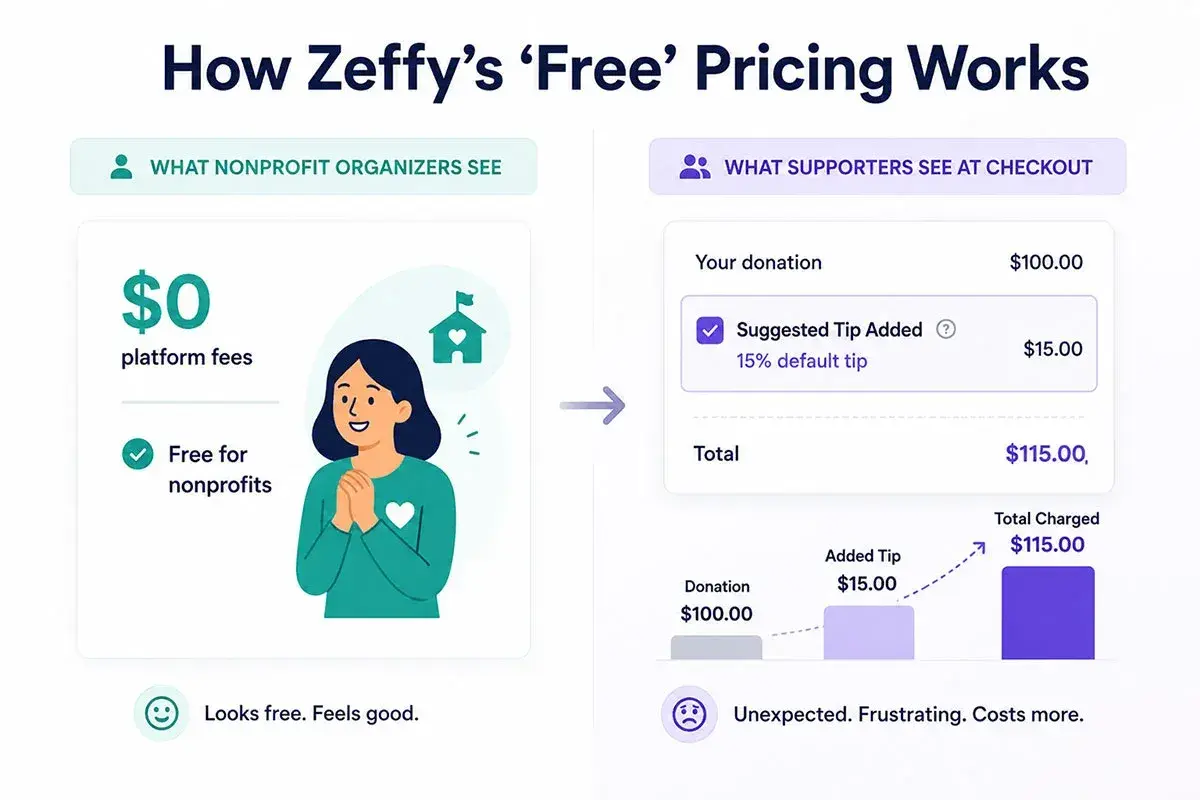
| True zero-fee nonprofit software | The nonprofit does not pay platform fees, and the platform is funded another way. | Events where every dollar needs to stay with the mission. | Tip prompts or alternative revenue models may not fit every audience. |
| Free for free events | $0 registrations are cost-free, but paid tickets still trigger charges. | Community events, orientations, volunteer nights, and open houses. | Not ideal if the event is a fundraiser. |
| Buyer-pays-fees | The organizer passes transaction costs to the attendee at checkout. | Paid galas, dinners, and fundraisers where transparency is acceptable. | Can add friction if the checkout screen feels crowded or confusing. |
| Low-fee paid ticketing | The platform charges a modest per-ticket or per-order fee. | Teams that need stronger registration, scanning, or seating tools. | Predictable, but not truly free. |

The platforms I would shortlist in 2026
If I had to narrow the field fast, I would compare the tools below first. Some are genuinely zero-cost for nonprofits, some are free only on free events, and some become effectively free when fees are passed through to the buyer.
| Platform | Pricing snapshot | Best for | Main trade-off |
|---|---|---|---|
| Zeffy | Positioned as 100% free for nonprofits, funded through optional donor tips. | Teams that want the cleanest no-fee setup and a nonprofit-first workflow. | The tip-based model is not the right fit for every audience or brand tone. |
| Givebutter | Free nonprofit ticketing with an optional tip-or-fee model. | Organizations that want ticketing, donations, CRM, and email in one stack. | You need to be clear on how tips or fees are configured before launch. |
| Eventbrite | No fees on free events; paid tickets carry service and processing fees. | Public-facing events where discovery and reach matter more than zero cost. | Not a zero-fee answer for paid fundraising events. |
| TicketSignup | $0.40 per ticket plus standard card processing; free tickets are free. | Structured nonprofit registration, email, and onsite check-in needs. | Very workable, but not free on paid tickets unless fees are passed through. |
| Ticketstripe | Buyer-pays model with a reduced nonprofit service fee. | Teams comfortable letting attendees cover the checkout costs. | The checkout fee becomes visible to supporters, which can affect conversion. |
| SimpleTix | No fees on free events; paid events use low per-ticket pricing. | Free community events, reserved seating, timed entry, and box office-style workflows. | Great for $0 registrations, less attractive if you need fee-free paid tickets. |
My short version is this: Zeffy is the cleanest zero-fee nonprofit option, Givebutter is strong when you want fundraising and ticketing together, Eventbrite is useful when discovery matters, and TicketSignup or SimpleTix make sense when the event structure is more complex. The right choice depends less on the badge on the homepage and more on what kind of event you are actually running.
Which setup fits which nonprofit event
Different nonprofit events need different mechanics. A gala is not the same thing as a volunteer orientation, and a community festival is not the same thing as a donor dinner. That is why I prefer matching the platform to the event shape first, then deciding on pricing.
Galas and donor dinners
For galas, I look for tools that can handle table sales, sponsor packages, comp tickets, and tax-deductible receipts without making staff do spreadsheet gymnastics afterward. A dinner ticket often includes a meal or experience value that is not fully deductible, so the software needs to support a split between the ticket price and the deductible donation portion. Zeffy and Givebutter are the easiest starting points if your priority is keeping costs at zero and keeping the donation flow clean.
Free community events and volunteer signups
If the event is free, the math changes. A volunteer training, neighborhood workshop, open house, or public forum does not need to generate revenue, but it does need clean headcount management. In that case, I would look at SimpleTix, Eventbrite, or Eventgroove if the main goal is organized registration, confirmation emails, and a tidy attendee list. Free events are where “free” should really mean free, so the platform should not quietly add a surprise cost later.
Timed entry and reserved seating
When seats matter, a flat registration form is not enough. Museums, theaters, festivals, and holiday programs often need timed entry slots, capacity controls, group orders, and reserved tables. That is where TicketSignup and SimpleTix usually pull ahead of lighter tools. You may pay something on paid tickets, but you get a workflow that is much easier to manage when admission is the core of the event.
Read Also: Free Membership Software - What Nonprofits Need to Know
Events that live inside a broader fundraising campaign
Some nonprofits do not want a separate ticketing tool at all. They want the event page, donation ask, email follow-up, and attendee data to live in the same place as the rest of their fundraising. That is where Givebutter and Zeffy tend to stand out. If your event is really part ticket sale, part donor conversion, part stewardship sequence, an all-in-one setup usually beats a stand-alone box office tool.
Once the event type is clear, the next filter is functionality. That is where the hidden time savings appear, and where many “free” tools quietly stop being free in practice.
Features that matter more than the headline fee
I would rather use a slightly less famous platform that handles nonprofit basics properly than a flashy one that creates extra manual work. The fee headline is only one variable. For most U.S. nonprofits, the real value sits in the operational details.
- Multiple ticket types so you can sell general admission, VIP, sponsor, staff, and comp tickets without workarounds.
- Group and table sales for galas and donor dinners, especially when one buyer purchases for multiple guests.
- QR check-in so volunteers can scan tickets at the door instead of searching spreadsheets.
- Donation upsells so a ticket buyer can add a gift without leaving the checkout flow.
- Branded confirmation emails and receipts so the event feels consistent and professional.
- Attendee export or CRM sync because event data should feed stewardship, not sit in a dead-end dashboard.
- Support for in-person sales if you expect walk-up tickets or sponsor guests arriving late.
For U.S. nonprofits, I also care about how the tool handles tax language. If a ticket bundles dinner, merchandise, or another benefit, your receipt should make the deductible portion clear. That one detail prevents confusion later and saves staff from revisiting every purchase by hand. Once those basics are covered, launch becomes much simpler.
How to launch a no-cost ticketing flow without creating more work
There is a difference between a free platform and a smooth process. I usually recommend the same launch sequence, because it keeps the setup honest and avoids avoidable surprises on event day.
- Decide who pays the fees before you publish. If the nonprofit is absorbing costs, write that into the budget. If the buyer is covering them, say so clearly in the event copy.
- Create ticket types that match the event. General admission, VIP, sponsor seats, table sales, and comp tickets should each have a distinct role.
- Add one optional donation step. A small upsell during checkout is often easier than asking again by email later.
- Test the flow on a phone. Most supporters will buy on mobile, so the checkout has to feel quick and obvious.
- Set receipt language early. If part of the ticket is not deductible, make that explicit before the first sale goes through.
- Confirm the door process. QR scanning, guest lookup, and walk-up sales should all be tested before the team arrives on site.
- Export the attendee list before the event. You want a backup copy in case a device, internet connection, or login fails at the door.
When that workflow is in place, the platform stops being a source of stress and becomes infrastructure. The next question is what still costs money even when the marketing says “free.”
The hidden costs that make “free” expensive
The biggest trap is not a visible fee. It is the fee you only notice after the event is live. I have seen teams save a little on software and then lose much more through payment processing, add-ons, or checkout friction that lowers conversions.
| Hidden cost | Why it matters | What to ask before launch |
|---|---|---|
| Payment processing | Credit card and wallet payments are rarely free, even if the platform is. | Who absorbs processing, and can the buyer cover it automatically? |
| Per-ticket service fees | Small fees become meaningful on multi-ticket orders or sponsor tables. | Is the fee per ticket or per order? |
| Add-ons and upgrades | Seat maps, SMS, advanced branding, or premium support can add cost fast. | What is included in the base plan, and what is extra? |
| Data export limits | If attendee data is hard to pull out, staff time becomes the hidden cost. | Can I export the full attendee list and transaction details easily? |
| Refund and support handling | One messy refund can cancel out the savings from a cheaper tool. | How fast can we resolve order changes or refunds? |
| Deductible ticket breakdowns | Gala tickets often need a split between the benefit value and the donation portion. | Can the platform show the deductible amount clearly on receipts? |
Here is the kind of math I like to do before I choose. On Eventbrite’s U.S. pricing, a paid ticket can carry a 3.7% service fee plus a $1.79 ticket fee and a 2.9% processing fee per order. On a two-ticket, $75 order, that is roughly $13.50 in fees before any extras. That is not automatically a bad deal, but it is not free, and it can change the fundraising math quickly.
That is why I do not stop at the pricing page. I ask which setup will still look and feel clean when a volunteer is standing at the door with a phone in one hand and a guest list in the other. That answer usually points to the right final choice.
The setup I would choose to keep every dollar working for the mission
If the goal is to protect revenue as much as possible, I would keep the decision simple. For a nonprofit that wants true zero-fee ticketing, I would start with Zeffy. For a team that wants ticketing inside a broader fundraising workflow, I would put Givebutter next on the list. If the event is free and the main need is registration control, I would consider SimpleTix, Eventbrite, or Eventgroove depending on whether I cared more about seating, reach, or lightweight setup.
My rule is straightforward: choose the platform that makes the fee structure obvious, the checkout easy, and the attendee data usable after the event. If a tool is “free” but leaves you with messy receipts, unclear tax handling, or manual cleanup at the door, the real cost is higher than the price tag suggests. The best nonprofit ticketing setup is the one your staff can run confidently and your supporters can understand in seconds.