
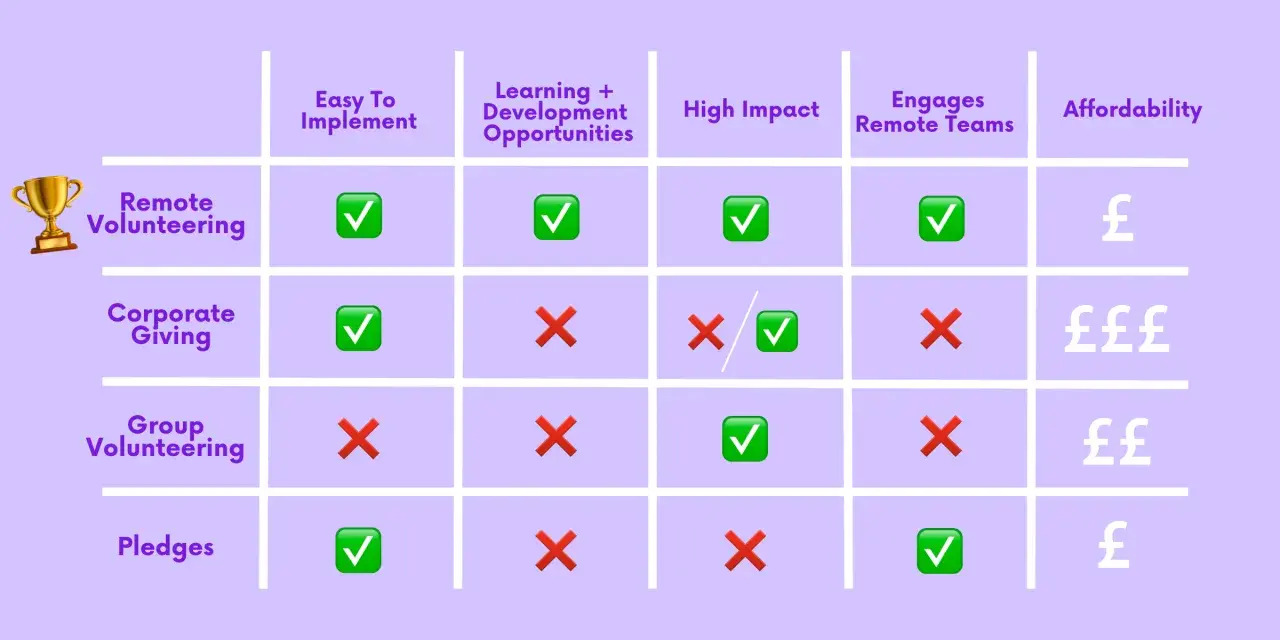
The best remote service keeps the task small, the impact visible, and the coordination simple
- Skills-based projects, transcription, mentoring, and short support calls are the most reliable group formats.
- Most listings fall into two buckets: live sessions and self-paced tasks.
- A group pilot works best when one person handles logistics, one handles tech, and one handles follow-up.
- Screening and training matter more when the work involves youth, health, or confidential information.
- The clearest listings tell you who can join, how long it takes, and what the nonprofit needs at the end.
Why remote volunteering fits groups better than many people expect
I think the biggest advantage of group volunteering online is not convenience by itself; it is reach. A school club in Ohio, a workplace team in Texas, and a family spread across two time zones can still contribute to the same project without travel or complicated scheduling. Points of Light describes virtual volunteering as ranging from one-time tasks to ongoing commitments, which is exactly why it fits groups with different energy levels and availability.
That said, a remote service day is not just a video call with good intentions. If the task is vague, the handoff is weak, or nobody owns the follow-up, the group leaves feeling busy rather than useful. I always look for a project that can be explained quickly, completed with modest friction, and handed off to a nonprofit in a form that saves staff time. That is where task selection matters.

The best kinds of remote group projects
Not every role survives contact with a group. The best ones have a visible output, a short learning curve, and enough structure that people can split up without stepping on each other.
| Project type | Why it works for groups | Main limitation |
|---|---|---|
| Skills-based consulting | Great for marketing, design, finance, HR, planning, and IT; people can divide into clear lanes and deliver a real handoff. | Usually needs a coordinator, some prework, and a nonprofit that can absorb professional-level input. |
| Digital transcription and research | Easy to split into small tasks, review as a team, and finish with a concrete result such as cleaned-up text or tagged records. | Quality control matters, especially when documents need accuracy and consistent formatting. |
| Mentoring and mock interviews | Feels human and immediate, especially for school, career, or employee groups that want direct interaction. | Needs scripts, scheduling, and sometimes screening if the work involves minors or sensitive life topics. |
| Phone-based check-ins and support | Low-tech but high-value for small groups that are comfortable speaking with empathy and following a simple structure. | Privacy, tone, and boundaries need to be clear from the start. |
| Content, translation, and awareness tasks | Useful for mixed-skill groups that can write, proofread, caption, translate, or assemble campaign assets together. | The impact can feel indirect unless the nonprofit explains exactly how the output will be used. |
I usually prefer projects with a clean finish line: a polished document, a reviewed page, a completed call log, or a finished practice interview. That kind of outcome keeps a group engaged because everyone can see where the effort went. It also makes it easier to judge whether the activity was a good fit, which leads straight into choosing the right format.
How to match the project to your group's capacity
The easiest way to choose is to start with the constraints, not the cause. How much time do you actually have? Does your group want a live shared experience, or would asynchronous work be easier? Are you comfortable with sensitive conversations, or should you stay on the document-and-data side? I ask those questions before I ever ask what the nonprofit does, because the wrong format burns more goodwill than the wrong cause.
- Start with the time window. For a first pilot, I usually aim for a 60-minute session rather than a half-day event.
- Decide whether the work needs real-time discussion. Live video is better for mentoring, coaching, and group problem-solving; self-paced work is better for transcription, tagging, and writing tasks.
- Match the risk to the skill level. If the task touches youth, health, or confidential records, build in screening, training, and supervision.
- Keep the group size manageable. Small groups are easier to coordinate; larger groups need breakouts or a stronger facilitator.
- Assign roles before the session starts. One person should own logistics, one should handle tech, and one should watch the output and follow-up.
For most first-time groups, I recommend a 60-minute pilot. Ten minutes for setup, about 40 minutes for the service itself, and the last 10 minutes for reflection is usually enough to feel organized without dragging the group down. Once that feels smooth, then you can move into more specialized projects or longer commitments. The next question is where to find a project that matches those constraints.
Where U.S. groups can find reliable listings
Two places I check first are Idealist and Points of Light. Idealist now lists 100,000+ ways to volunteer across 56 cause areas, while Points of Light says thousands of virtual opportunities are available, from one-time tasks to ongoing commitments. Those platforms are useful because they make it easier to filter by remote, cause area, skill, and whether a group can participate.Beyond that, I look at local nonprofit portals, museum and archive transcription projects, library and education programs, and employer volunteer platforms. For U.S. groups, I want the listing to answer three questions before I commit: is the work open nationwide or limited to a region, does it require volunteers to be in the United States, and what happens after we submit the work?
If a listing is vague on those basics, I usually move on. Clear requirements are a good sign that the organization knows how to use volunteers well.
What a smooth virtual service session looks like
The most successful sessions feel simple on the surface and carefully designed underneath. I like to send a short prep note that includes the purpose, the start time, the platform link, the expected length, the dress code if there is one, and the exact output the nonprofit wants. That saves everyone from the awkward first five minutes where people are guessing what to do.
- Open with a quick introduction to the cause and the task.
- Show one example of finished work before anyone starts.
- Split people into pairs or small pods if the task benefits from discussion.
- Keep a shared checklist visible so progress is easy to track.
- Close with a short debrief and a clear thank-you that explains the impact.
If the session is asynchronous, the same logic still applies. Give volunteers one owner, one checklist, and one deadline, then review the output quickly so they know their time mattered. A good remote service day should feel guided, not improvised.
The mistakes that make the experience feel thin
The biggest mistake I see is treating remote service like a mood instead of a workflow. A nonprofit does not need a cheerful group on camera; it needs a clear deliverable, a realistic timeline, and volunteer labor that fits the job.
- Choosing a project that sounds good in theory but has no real handoff.
- Assuming every volunteer can jump in without training.
- Mixing sensitive work with people who have no supervision or script.
- Skipping quality control when the output will be public or client-facing.
- Forgetting to measure the result, so no one knows what changed.
I also avoid any setup where the volunteer work clearly replaces a paid role or requires professional oversight the organization cannot provide. That boundary keeps the program ethical and keeps volunteers from doing work that leaves them uneasy.
How to turn one good event into a repeatable habit
After the first event, I collect three things: what volunteers said felt easy, what the nonprofit said was most useful, and where the process slowed down. That feedback is usually more valuable than a long survey, because it shows whether the project was genuinely group-friendly or just barely workable.
- Save the agenda, checklist, and contact list so the next session takes less setup.
- Keep a running record of hours, deliverables, or completed tasks.
- Rotate people into roles like facilitator, tech host, and quality checker.
- Repeat the same format once before changing too many variables.
