
What matters most before you launch a donation page
- Use a donation block, not a generic contact form, if you want a real checkout flow and donation tracking.
- In the US, Squarespace Payments is usually the cleanest option because it supports cards, Apple Pay, and ACH direct debit.
- Recurring donations on Squarespace require version 7.1 and either Squarespace Payments or Stripe.
- PayPal is fine for one-time gifts, but it is not the right choice for recurring giving in Squarespace.
- On a Business plan, Squarespace adds a 3% transaction fee to donations; Commerce plans are 0% in the current fee table.
How the donation block handles giving
The donation block is Squarespace’s built-in checkout for charities, causes, events, and other fundraising pages. I treat it as a compact giving tool: donors choose an amount, complete payment, and receive a confirmation without leaving your site. That matters because every extra click can reduce completion rates.
Setup still happens on a computer, not in the Squarespace app, and you must connect a payment processor before anyone can check out. Once the block is live, you can set suggested amounts, allow custom giving, rename the default fund, and create multiple funds if you want to separate programs or campaigns. You can also adjust the button text, title, description, form fields, and receipt email so the page feels like part of your organization instead of a generic payment widget.
There are a few operational details I always watch closely. Donation checkout always asks for an email address and phone number, transaction fees apply, and your store tax rules do not apply to donations. If you need more context from donors, Squarespace lets you add a donation form or custom checkout form, which is useful for dedications, restricted gifts, or special acknowledgements. The only catch is that you should keep that friction low unless the extra data is truly necessary, because donation pages are conversion pages first and data collection tools second. That leads directly to the most important decision: which payment rail to use.Which payment setup makes the most sense in the US
If I were setting this up for a US nonprofit, I would start with Squarespace Payments whenever it is available. It keeps the transaction and payout details inside Squarespace, and it supports the payment methods donors tend to expect most often. I would keep Stripe in mind as a fallback or an existing stack choice, and I would treat PayPal as a convenience option for one-time donors rather than the core of the giving flow.
| Payment setup | Best for | Strengths | Watch-outs |
|---|---|---|---|
| Squarespace Payments | Most US nonprofits that want one native system | Cards, Apple Pay, ACH direct debit in the US, recurring donations, and built-in reporting | Availability depends on region and verification; first payouts can be held for 8 to 12 consecutive days after bank setup |
| Stripe | Teams that already use Stripe or need a fallback where native payments are unavailable | Supports recurring donations on version 7.1, and it is a familiar processor for many organizations | More of the donor and payout workflow sits outside Squarespace |
| PayPal | Donors who prefer PayPal or Venmo for one-time gifts | Easy recognition and a familiar checkout for some audiences | Not usable for recurring donations on the donation block |
I also like that Squarespace lets you connect both PayPal and Squarespace Payments, so you do not have to force every donor into the same checkout habit. In practice, that flexibility helps when your audience includes both older supporters who trust PayPal and newer donors who prefer Apple Pay or a card tap on mobile. Once the payment layer is settled, the real conversion work begins on the page itself.

How to design a donation page that actually gets completed
The donation page should feel obvious, not hidden. I usually want it linked in the header, repeated in the footer, and featured on the homepage if fundraising is a primary goal. Squarespace’s own guidance for asking for donations leans the same way: make the donation page easy to find, use a simple page title and URL slug, and keep the donation section visible without making visitors hunt for it.
For most nonprofit sites, the best structure is simple. Lead with a short mission statement, add one strong image, place the donation block near the top, and support it with a few lines that explain where the money goes. If your work is community-facing, I would rather see one clear impact statement than three paragraphs of generic fundraising language. Donors respond better when they understand the use case quickly.
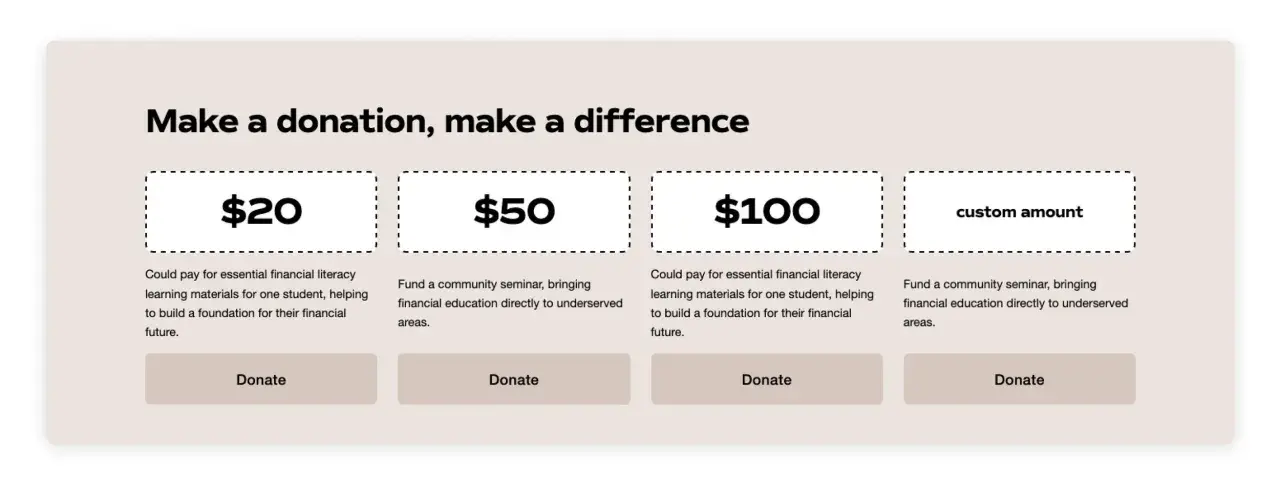
Suggested donation amounts matter more than most teams think. I normally recommend three visible options: a lower-friction amount, a middle option that feels like the default, and a larger stretch amount for committed supporters. You can still leave room for custom giving, but the suggestions anchor the decision. Squarespace also lets you label specific amounts, which is useful for sponsorship-style pages like “feeds 10 families” or “supports one workshop.” That kind of labeling gives people a reason to give beyond the raw number.
If you need more donor information, keep it focused. I would only add fields for things like dedication notes, program designation, or a thank-you gift. The more fields you add, the more likely someone is to quit before donating. A donation page is not the place to collect everything in one pass; it is the place to make the next step effortless. The next step, for many nonprofits, is recurring support.
Recurring giving and donor management
Recurring donations are where Squarespace becomes much more useful for nonprofit work, because monthly support usually matters more than one-off spikes. On version 7.1, recurring giving is available only when the site is connected to Squarespace Payments or Stripe. If the site still uses an older donation block, I would not assume monthly giving is configured correctly until I verify that the newer block is in place.There is one non-negotiable requirement: customer accounts must be enabled. That is not just a technical checkbox. Recurring donors need an account so they can manage their own giving later, and that reduces support load for your team. Donors can see their next renewal date, donation amount, renewal frequency, history, and saved billing information, then cancel recurring support themselves if needed.
From the organization side, Squarespace gives you a donor profile and donation management view where you can review recurring gifts and cancel them if necessary. That makes the system workable for smaller nonprofit teams that do not want to juggle separate finance tools just to keep monthly gifts in order. I like that balance: donors keep control, and staff keep visibility. Still, none of this matters much if the economics do not work, so the next section is the one I always review before launching.
Costs and limits that change the math
The fastest mistake I see is assuming that “accepting donations” means “no real cost.” In Squarespace, donations are treated like commerce transactions, so fees still apply. On current help docs, Business sites carry a 3% Squarespace transaction fee on donations, while Commerce Basic and Commerce Advanced are at 0%. If you are on one of the newer billing plan rollouts, check your exact plan row, because the fee table depends on the billing model you are on.
Here is the practical version of that math: if your site processes $10,000 in donations on a Business plan, Squarespace’s transaction fee alone is $300 before the payment processor fee. That is not catastrophic, but it is large enough to matter for a lean nonprofit budget. When I compare options, I look at both the monthly platform cost and the cost per gift, because the cheap-looking setup can become expensive once giving volume grows.
- Donation setup is desktop-only so your team should test and publish from a computer, not the app.
- Donation checkout always asks for email and phone so donors will see those fields even if you do not add extra custom fields.
- Your store tax rules do not apply to donations which is helpful for keeping the checkout clean, but it also means you should handle compliance language separately if your organization needs it.
- First payouts can be delayed because Squarespace Payments uses an 8 to 12 consecutive-day holding period after bank connection before the first payout arrives.
- PayPal does not work for recurring donations on the donation block, so do not promise monthly giving unless you have Stripe or Squarespace Payments in place.
When Squarespace is enough and when I would add nonprofit software
I think Squarespace is strongest as a public-facing fundraising layer. It handles the website, the giving page, the payment checkout, the recurring gift flow, and the basic donation dashboard well enough for a lot of small and mid-sized community organizations. If your nonprofit is running one or two campaigns, managing a modest donor list, and mainly needs a polished donation page that does not feel bolted on, Squarespace can absolutely carry the job.
I would add dedicated nonprofit software when the organization starts needing more back-office structure than Squarespace is meant to provide. That usually shows up as a real donor CRM, automated receipting and tax-letter workflows, campaign segmentation, grant tracking, deeper stewardship pipelines, chapter-level reporting, or accounting integrations that the fundraising team relies on every day. At that point, Squarespace should still be your front door, but it should stop pretending to be your entire operations stack.
That is the clearest way I know to think about it: Squarespace is excellent for making it easy to give, while nonprofit software is better at organizing everything that happens after the gift lands. If your team is still small, you may not need more than the first layer yet, and that is fine. What matters is not collecting tools for their own sake, but matching the system to the size and rhythm of the mission. The last section is the setup I would choose if I had to launch quickly without creating future cleanup work.
A lean setup I would use for a small nonprofit site
If I were launching a US nonprofit site in 2026, I would keep the build intentionally simple. I would use Squarespace Payments if available, because that gives me cards, Apple Pay, and ACH without forcing donors through a patchwork checkout. I would create one dedicated donation page, place it in the main navigation, add a button in the header, and repeat the link in the footer so nobody has to hunt for it.
On the page itself, I would use three suggested amounts, leave room for a custom amount, add one short mission paragraph, and switch on recurring giving for supporters who want to commit monthly. I would also enable the option for donors to cover fees if that fits the tone of the campaign, because that can preserve more of each gift without making the page feel aggressive. If the organization needs extra data, I would ask for it sparingly and only where it affects donor stewardship or restricted fund handling.
That setup is usually enough to make the giving experience feel clean, credible, and fast. For many community organizations, that is exactly the point: keep the technology invisible and let the mission do the work.
